

Microsoft SQL
MS SQL is a relational database management system that stores and retrieves data as requested by other software applications.
This connector supports the most recent versions of both SQL Server and Azure SQL deployments.
Default Functionality
Section titled “Default Functionality”This standard SQL database connector performs queries against the source database to synchronize data. It offers a straightforward approach suitable for most use cases, enabling time-stamp based CDC replication.
All SQL database connectors are configured similarly and offer an advanced mode.
For guidance on basic configuration, please refer to our tutorial: Loading Data with Database data source connector.
CDC (Change Data Capture) Mode
Section titled “CDC (Change Data Capture) Mode”This connector facilitates incremental syncs using the MS SQL’s native Change Data Capture (CDC) functionality.
This mode of incremental fetching is available only for tables with CDC enabled on your server. For more details on the server-side setup, refer to the official documentation.
Tables with CDC enabled are indicated in the Table dropdown with a [CDC] prefix.
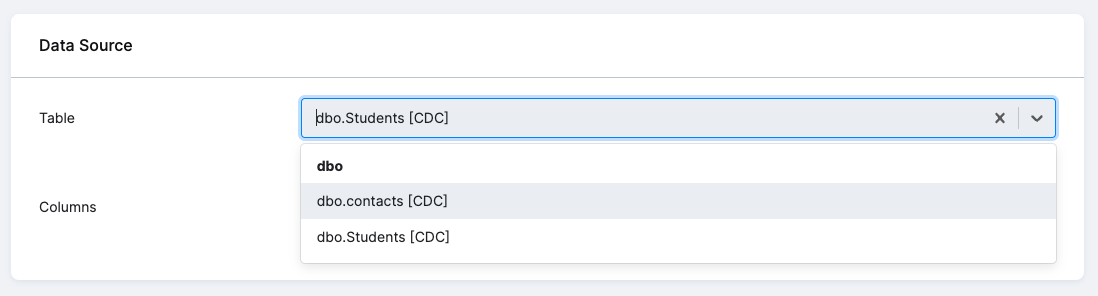
Upon selecting a CDC-enabled table, the CDC Mode option will become visible in the Incremental Fetching box. Check this option to activate the CDC syncing for that table.
Functionality
Section titled “Functionality”Once you activate the CDC mode, the component will synchronize new increments using the system function cdc_get_net_changes.
This utilizes dynamic boundaries based on the component state, ensuring that only the most recent changes are retrieved. The primary advantage of this method is its ability to swiftly capture all modifications, including deletions.
The table’s initial load will undergo a full sync, similar to the standard incremental fetching mode. After the initial load, CDC tables come to play. The resulting table will contain an additional system column:
KBC__DELETED-> [0,1] This flag indicates whether the row was deleted.0indicates it was not deleted, and1indicates deletion.
Limitations
Section titled “Limitations”- Schema (DDL) changes are not supported. Any alterations post-CDC setup will not reflect in the table. Destructive DDL may lead to synchronization failures with various errors.
- The retention window for changes in the CDC tables can vary per setup.
If the configuration runs after a period longer than the CDC retention window (i.e., some older change events might have been already dropped from the CDC table), the component will do a full sync, reloading the entire table. This could prolong execution times.
Note: This behavior can be adjusted.