

MySQL
MySQL is an open source database that enables the delivery of high-performance, scalable web-based, and embedded database applications.
Our connectors support the latest versions of MySQL and AWS Aurora. You can choose among different strategies to synchronize your data:
Query-Based Connector
Section titled “Query-Based Connector”This standard connector performs queries against the source database to sync data. It is a straightforward approach suitable for most use cases, allowing for time-stamp based CDC replication.
All connectors are configured similarly and offer an advanced mode.
Basic configuration is covered in the Tutorial - Loading Data from Database.
MySQL Log-Based CDC
Section titled “MySQL Log-Based CDC”This connector is compatible with MySQL databases hosted on AWS RDS, Aurora MySQL, and standard non-hosted MySQL, as well as MariaDB databases.
Functionality
Section titled “Functionality”The connector uses the Debezium connector as its underlying technology.
MySQL employs a binary log (binlog) that records all operations in the order they are committed to the database. This includes both changes to table schemas and data, which MySQL uses for replication and recovery purposes.
This MySQL connector reads the binlog, produces change events for row-level INSERT, UPDATE, and DELETE operations.
Because MySQL typically purges binlogs after a specified period, the MySQL connector first performs an initial consistent snapshot of each database. It then reads the binlog from the point where the snapshot was taken.
Supported Versions
- MySQL: 5.7, 8.0.x, 8.2
- MariaDB: 11.1.2
Snapshots
Section titled “Snapshots”When the connector starts for the first time, it performs an initial consistent snapshot of your database. This snapshot establishes a baseline of the current database state.
During the snapshot, the connector completes a series of tasks that vary depending on the selected snapshot mode and the database’s table-locking policy.
You can select different snapshot modes in the Sync Options > Replication Mode configuration.
For more technical details on Snapshots, see the Debezium official documentation.
Table locking
Section titled “Table locking”The Debezium MySQL connector follows specific steps when performing an initial snapshot that involves a global read lock or table-level locks.
These read locks ensure snapshot consistency, especially if schema changes occur during the snapshot process.
Resumable Snapshots
Section titled “Resumable Snapshots”The Debezium MySQL connector supports partially resumable snapshots, enabling the connector to recover from failures during the snapshot process. Such failures might occur due to network issues or connector timeouts.
If a failure occurs during the snapshot phase, the connector logs a warning message and terminates the job gracefully, saving the progress made up to that point. Upon restarting, the connector resumes the snapshot from the last known position, retrying the snapshot for the last unfinished table and any remaining tables.
Schema Drift
Section titled “Schema Drift”To accurately process events following a schema change, MySQL logs both row-level changes and DDL statements in the transaction log.
When the connector encounters DDL statements in the binlog, it parses them and updates an in-memory schema for each table.
This schema representation allows the connector to identify the table structure at the time of each insert, update, or delete operation, ensuring the correct production
of change events.
The connector logs all DDL statements and their binlog positions in a separate output table, io_debezium_connector_mysql_schema_changes.
The connector seamlessly handles schema changes in the source database, such as adding or dropping columns. Here’s how specific changes are managed:
- ADD column
- The new column is added to the destination table. Historical values for this column remain empty (defaults are not applied).
- The DDL is logged in
io_debezium_connector_mysql_schema_changes.
- DROP column
- The column remains in the destination table.
- If the column has a
NOT NULLconstraint, it will be overridden and removed. - The column’s value will be
NULL/EMPTYfrom the point of deletion. - The DDL is recorded in
io_debezium_connector_mysql_schema_changes.
Schema change table
Section titled “Schema change table”io_debezium_connector_mysql_schema_changes is a table that logs schema changes applied to the database. It represents the
underlying Debezium Schema Change Topic.
| Column name | Description |
|---|---|
source | Structured in the same way as standard data change events, which the connector writes to table-specific topics. This field helps correlate events across different topics. |
ts_ms | An optional field showing the time at which the connector processed the event, based on the system clock in the JVM running the Kafka Connect task. In the source object, ts\_ms indicates the database change time. By comparing payload.source.ts\_ms with payload.ts\_ms, you can determine the lag between the source database update and Debezium processing. |
databaseName schemaName | Identifies the database and schema containing the change. The databaseName field is used as the record’s message key. |
ddl | Contains the DDL statement responsible for the schema change, potentially with multiple statements. Each statement applies to the databaseName. If multiple statements apply to multiple databases, MySQL applies them in order, and the connector groups them by database, creating a schema change event for each group. If applied individually, a separate schema change event is created for each statement. |
tableChanges | An array containing one or more items with schema changes generated by a DDL command. |
type | Describes the type of change: CREATE (table created), ALTER (table modified), DROP (table deleted). |
id | The full identifier of the table that was created, altered, or dropped. For table renames, this is a concatenation of *<old>*,*<new>* table names. |
table | Contains table metadata after the applied change. |
primaryKeyColumnNames | Lists the columns that make up the table’s primary key. |
columns | Metadata for each column in the changed table. |
attributes | Custom attribute metadata for each table change. |
Data Type Mapping
Section titled “Data Type Mapping”MySQL data types are mapped to Keboola Base Types as follows:
| Source Type | Base Type | Note |
|---|---|---|
| INTEGER | INTEGER | |
| TINYINT | INTEGER | |
| SMALLINT | INTEGER | |
| MEDIUMINT | INTEGER | |
| BIGINT | INTEGER | |
| FLOAT | FLOAT | |
| DOUBLE | FLOAT | |
| REAL | FLOAT | |
| DECIMAL | NUMERIC | |
| DATE | DATE | YYYY-MM-DD format when Native Types are disabled |
| DATETIME | TIMESTAMP | YYYY-MM-DD HH:MM:SS format when Native Types are disabled |
| TIMESTAMP | TIMESTAMP | YYYY-MM-DD HH:MM:SS+TZ format (UTC) when Native Types are disabled |
| TIME | STRING | HH:MM:SS format |
| YEAR | INTEGER | |
| CHAR | STRING | |
| VARCHAR | STRING | |
| BLOB | STRING | Representation depends on the selected Binary Handling Mode |
| TEXT | STRING | |
| TINYBLOB | STRING | Representation depends on the selected Binary Handling Mode |
| TINYTEXT | STRING | |
| MEDIUMBLOB | STRING | Representation depends on the selected Binary Handling Mode |
| MEDIUMTEXT | STRING | |
| LONGBLOB | STRING | Representation depends on the selected Binary Handling Mode |
| LONGTEXT | STRING | |
| ENUM | STRING | |
| SET | STRING | |
| BIT | STRING | |
| BINARY | STRING | |
| VARBINARY | STRING | |
| GEOMETRY | STRING | |
| JSON | STRING | |
| BOOLEAN | INTEGER | MySQL represents boolean as TINYINT(1) |
System Columns
Section titled “System Columns”Each result table includes the following system columns:
| Name | Base Type | Note |
|---|---|---|
| KBC__OPERATION | STRING | Event type, e.g., r - read on init sync; c - INSERT; u - UPDATE; d - DELETE |
| KBC__EVENT_TIMESTAMP_MS | TIMESTAMP | Source database transaction timestamp. Displayed in miliseconds since epoch if Native types are not enabled. |
| KBC__DELETED | BOOLEAN | Indicates if the event is a delete event (true if deleted). |
| KBC__FILE | STRING | Binlog file name containing the transaction. |
| KBC__POS | INTEGER | Position within the binlog file for the transaction. |
| KBC__BATCH_EVENT_ORDER | INTEGER | Numeric order of the events within the current batch (extraction). Can be combined with KBC__EVENT_TIMESTAMP_MS to track the latest event per record (ID). |
Supported MySQL Topologies
Section titled “Supported MySQL Topologies”The Debezium MySQL connector supports the following MySQL topologies:
Standalone
Section titled “Standalone”When using a single MySQL server, the server must have binlog enabled (optionally, GTIDs enabled) to allow monitoring by the Debezium MySQL connector. The binary log can also be used as an incremental backup. In standalone setups, the connector always connects to and follows the specified MySQL instance.
Primary and replica
Section titled “Primary and replica”The Debezium MySQL connector can follow a primary server or a replica (if that replica has its binlog enabled). However, it only captures changes visible to that server, which may impact multi-primary topologies.
Since the connector logs its position within the server’s binlog (unique to each server), it must follow a single MySQL instance. to avoid inconsistencies. In case of server failure, the server must be restarted or recovered for the connector to resume tracking changes.
High-availability clusters
Section titled “High-availability clusters”MySQL support a variety of high-availability (HA) solutions provide resilience and rapid recovery from failures. Most HA MySQL clusters rely on Global Transaction Identifiers (GTIDs) to ensure that replicas can track all changes across primary servers.
Multi-primary
Section titled “Multi-primary”The Network Database (NDB) cluster replication topology uses one or more MySQL replica nodes replicating from multiple primary servers. This setup requires GTIDs and follows for robust multi-source replication, making it ideal for aggregating changes across multiple MySQL clusters.
A Debezium MySQL connector can use these multi-primary MySQL replicas as sources. If failover occurs, the connector can switch to a new replica, provided that the replica is caught up with the initial replica. Even when only a subset of databases and tables is in use, the connector can be configured to include or exclude specific GTID sources. This flexibility enables the connector to locate the correct position in the binlog when reconnecting to a new multi-primary MySQL replica.
Hosted
Section titled “Hosted”The Debezium MySQL connector is also compatible with hosted MySQL options, such as Amazon RDS and Amazon Aurora. While these hosted options lack global read lock support, table-level locks are used to create a consistent snapshot, ensuring reliable data consistency in these environments.
Using Connector with MariaDB Database
Section titled “Using Connector with MariaDB Database”While the Debezium MySQL connector can connect to MariaDB using the MySQL driver, enabling MariaDB adapter mode allows it to fully utilize the MariaDB-specific driver and feature set. For optimal compatibility and performance:
- Set the
Connector adapterconfiguration property toMariaDB. - Provide MariaDB-compliant database protocol and JDBC driver strings.
After you apply the Maria DB supplemental configuration, the Debezium MySQL connector uses the MariaDB adapter connector, which natively streams changes from MariaDB binary transaction logs.
Prerequisites
Section titled “Prerequisites”Setting Up MySQL
Section titled “Setting Up MySQL”Setting up MySQL is required before installing and running the Debezium connector.
Creating a user
Section titled “Creating a user”A Debezium MySQL connector requires a MySQL user account. This MySQL user must have appropriate permissions on all databases for which the Debezium MySQL connector captures changes.
Prerequisites
- A MySQL server.
- Basic knowledge of SQL commands.
Procedure
- Create the MySQL user:
CREATE USER 'user'@'localhost' IDENTIFIED BY 'password';- Grant the required permissions to the user:
GRANT SELECT, RELOAD, SHOW DATABASES, REPLICATION SLAVE, REPLICATION CLIENT ON *.* TO 'user' IDENTIFIED BY 'password';The table below describes the permissions.
If a hosted option such as Amazon RDS or Amazon Aurora does not allow a global read lock, table-level locks can create a consistent snapshot.
In this case, you also need to grant LOCK TABLES permissions to the user you create. See snapshots for more details.
- Finalize the user’s permissions:
mysql> FLUSH PRIVILEGES;Descriptions of user permissions:
| Keyword | Description |
|---|---|
SELECT | Enables the connector to select rows from tables in databases. This is used only when performing a snapshot. |
RELOAD | Enables the connector use the FLUSH statement to clear or reload internal caches, flush tables, or acquire locks. This is used only when performing a snapshot. |
SHOW DATABASES | Enables the connector to see database names by issuing the SHOW DATABASE statement. This is used only when performing a snapshot. |
REPLICATION SLAVE | Enables the connector to connect to and read the MySQL server binlog. |
REPLICATION CLIENT | Enables the connector the use of the following statements: * SHOW MASTER STATUS * SHOW SLAVE STATUS * SHOW BINARY LOGS The connector always requires this. |
ON | Identifies the database to which the permissions apply. |
TO 'user' | Specifies the user to grant the permissions to. |
IDENTIFIED BY 'password' | Specifies the user’s MySQL password. |
Enabling the binlog
Section titled “Enabling the binlog”You must enable binary logging for MySQL replication. The binary logs record transaction updates for replication tools to propagate changes.
Prerequisites
- A MySQL server.
- Appropriate MySQL user privileges.
Procedure
- Check whether the
log-binoption is already on:
// for MySql 5.xmysql> SELECT variable_value as "BINARY LOGGING STATUS (log-bin) ::"FROM information_schema.global_variables WHERE variable_name='log_bin';// for MySql 8.xmysql> SELECT variable_value as "BINARY LOGGING STATUS (log-bin) ::"FROM performance_schema.global_variables WHERE variable_name='log_bin';- If it is
OFF, configure your MySQL server configuration file with the following properties, which are described in the table below:
server-id = 223344 # Querying variable is called server_id, e.g. SELECT variable_value FROM information_schema.global_variables WHERE variable_name='server_id';log_bin = mysql-binbinlog_format = ROWbinlog_row_image = FULLbinlog_expire_logs_seconds = 864000- Confirm your changes by checking the binlog status once more:
// for MySql 5.xmysql> SELECT variable_value as "BINARY LOGGING STATUS (log-bin) ::"FROM information_schema.global_variables WHERE variable_name='log_bin';// for MySql 8.xmysql> SELECT variable_value as "BINARY LOGGING STATUS (log-bin) ::"FROM performance_schema.global_variables WHERE variable_name='log_bin';- If you run MySQL on Amazon RDS, you must enable automated backups for your database instance for binary logging to occur. If the database instance is not configured to perform automated backups, the binlog is disabled, even if you apply the settings described in the previous steps.
Descriptions of MySQL binlog configuration properties:
| Property | Description |
|---|---|
server-id | The value for the server-id must be unique for each server and replication client in the MySQL cluster. During MySQL connector setup, Debezium will assign a unique server ID to the connector. |
log_bin | The value of log_bin is the base name of the sequence of binlog files. |
binlog_format | The binlog-format must be set to ROW or row. |
binlog_row_image | The binlog_row_image must be set to FULL or full. |
binlog_expire_logs_seconds | The binlog_expire_logs_seconds corresponds to the deprecated system variable expire_logs_days. This is the number of seconds for automatic binlog file removal. The default is 2592000, which equals 30 days. Set the value to match the needs of your environment. See MySQL purges binlog files. |
Enabling GTIDs
Section titled “Enabling GTIDs”Global transaction identifiers (GTIDs) uniquely identify transactions that occur on a server within a cluster. Though not required for a Debezium MySQL connector, using GTIDs simplifies replication and enables you to more easily confirm if primary and replica servers are consistent.
GTIDs are available in MySQL 5.6.5 and later. See the MySQL documentation for more details.
Prerequisites
- A MySQL server.
- Basic knowledge of SQL commands.
- Access to the MySQL configuration file.
Procedure
- Enable
gtid_mode:
mysql> gtid_mode=ON- Enable
enforce_gtid_consistency:
mysql> enforce_gtid_consistency=ON- Confirm the changes:
mysql> show global variables like '%GTID%';Result
+--------------------------+-------+| Variable_name | Value |+--------------------------+-------+| enforce_gtid_consistency | ON || gtid_mode | ON |+--------------------------+-------+Descriptions of GTID options:
| Option | Description |
|---|---|
gtid_mode | Boolean that specifies whether the GTID mode of the MySQL server is enabled or not. * ON = enabled * OFF = disabled |
enforce_gtid_consistency | Boolean that specifies whether the server enforces GTID consistency by allowing the execution of statements that can be logged in a transactionally safe manner. Required when using GTIDs. * ON = enabled * OFF = disabled |
Configuring session timeouts
Section titled “Configuring session timeouts”When an initial consistent snapshot is made for large databases, your established connection could timeout while the
tables are being read. You can prevent this behavior by configuring interactive_timeout and wait_timeout in your
MySQL configuration file.
Prerequisites
- A MySQL server.
- Basic knowledge of SQL commands.
- Access to the MySQL configuration file.
Procedure
- Configure
interactive_timeout:
mysql> interactive_timeout=<duration-in-seconds>- Configure
wait_timeout:
mysql> wait_timeout=<duration-in-seconds>Descriptions of MySQL session timeout options:
| Option | Description |
|---|---|
interactive_timeout | The number of seconds the server waits for activity on an interactive connection before closing it. See MySQL’s documentation for more details. |
wait_timeout | The number of seconds the server waits for activity on a non-interactive connection before closing it. See MySQL’s documentation for more details. |
Enabling query-log events
Section titled “Enabling query-log events”You might want to see the original SQL statement for each binlog event.
Enabling the binlog_rows_query_log_events option in the MySQL configuration or binlog_annotate_row_events in the
MariaDB configuration file allows you to do this.
This option is available in MySQL 5.6 and later.
Prerequisites
- A MySQL server.
- Basic knowledge of SQL commands.
- Access to the MySQL configuration file.
Procedure
- Enable
binlog_rows_query_log_eventsin MySQL orbinlog_annotate_row_eventsin MariaDB:
mysql> binlog_rows_query_log_events=ONmariadb> binlog_annotate_row_events=ONbinlog_rows_query_log_events or binlog_annotate_row_events is set to a value that enables/disables support for
including the original SQL statement in the binlog entry.
+ `ON` = enabled+ `OFF` = disabledValidating binlog row value options
Section titled “Validating binlog row value options”Check binlog_row_value_options variable, and make sure that value is not set to PARTIAL_JSON, since in such case
connector might fail to consume UPDATE events.
Prerequisites
- A MySQL server.
- Basic knowledge of SQL commands.
- Access to the MySQL configuration file.
Procedure
- Check the current variable value
show global variables where variable_name = 'binlog_row_value_options';- Result
+--------------------------+-------+| Variable_name | Value |+--------------------------+-------+| binlog_row_value_options | |+--------------------------+-------+- In case the value is
PARTIAL_JSON, unset this variable by:
set @@global.binlog_row_value_options="" ;Configuration
Section titled “Configuration”Connection Settings
Section titled “Connection Settings”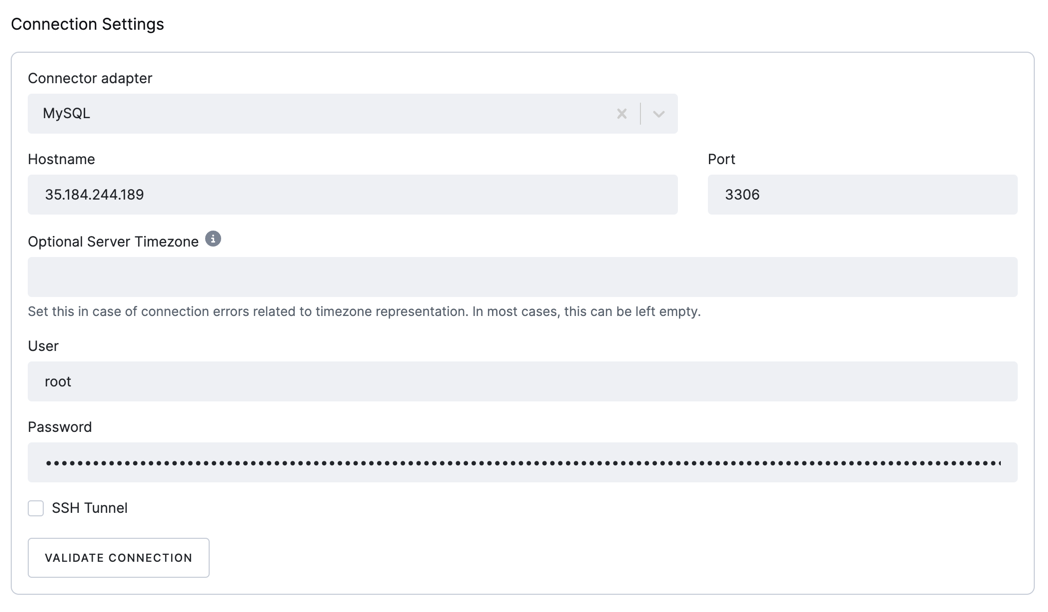
- Connector adapter: The connector adapter to be used. The following options are available:
MySQL: The connector uses the MySQL driver to connect to the MySQL database.MariaDB: The connector uses the MariaDB driver to connect to the MariaDB database.
- Server Timezone - [Optional] If the server uses a timezone that is not in Country/City format, the underlying JDBC driver needs a specification of the timezone in the supported format. For instance, instead of
CEST, useEurope/Prague. This property sets the JDBC connection property connectionTimeZone. - Host: The hostname of the MySQL server.
- Port: The port number of the MySQL server.
- User: The username used to connect to the MySQL server.
- Password: The password used to connect to the MySQL server.
SSH tunnel
Section titled “SSH tunnel”You may opt to use an SSH Tunnel to secure your connection. Find detailed instructions for setting up an SSH tunnel in the developer documentation. While setting up an SSH tunnel requires some work, it is the most reliable and secure option for connecting to your database server.
Data Source
Section titled “Data Source”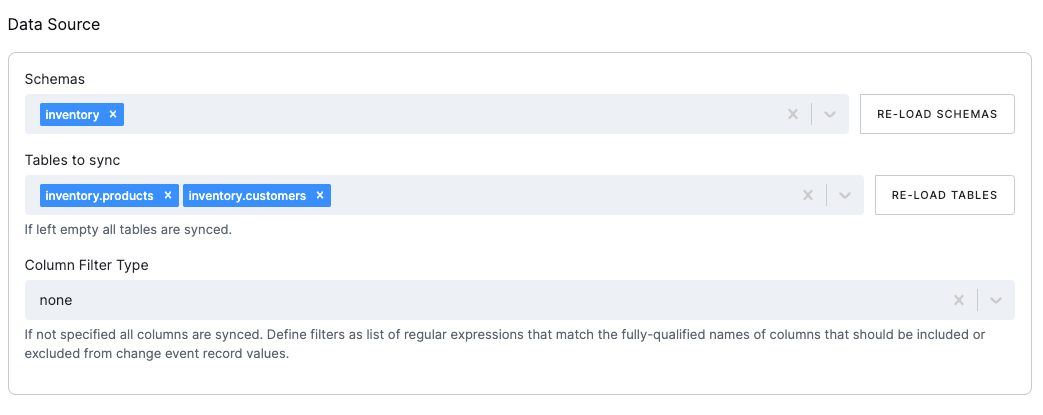
- Schemas: The schemas to be included in the CDC. The schemas are the databases in the MySQL instance.
- Tables: The tables to be included in the CDC. If left empty, all tables in the selected schemas will be included.
Column filters
Section titled “Column filters”The column filters are used to specify which columns should be included in the extraction. The list can be defined as a
comma-separated list of
fully-qualified names, i.e., in the form schemaName.tableName.columnName.
To match the name of a column, the connector applies the regular expression that you specify as an anchored regular expression. That is, the expression is used to match the entire name string of the column; it does not match substrings that might be present in a column name.
- Column Filter Type: The column filter type to be used. The following options are available:
None: No filter applied, all columns in all tables will be extracted.Include List: The columns to be included in the CDC.Exclude List: The columns to be excluded from the CDC.
- Column List: List of the fully-qualified column names or regular expressions that match the columns to be included or excluded (based on the selected filter type).
Column masks
Section titled “Column masks”Column masks are used to mask sensitive data in the extraction. A comma-separated list of fully qualified names for columns is of the form schemaName.tableName.columnName.
To match the name of a column, the connector applies the regular expression that you specify as an anchored regular expression. That is, the expression is used to match the entire name string of the column; it does not match any substrings that might be present in the column name.
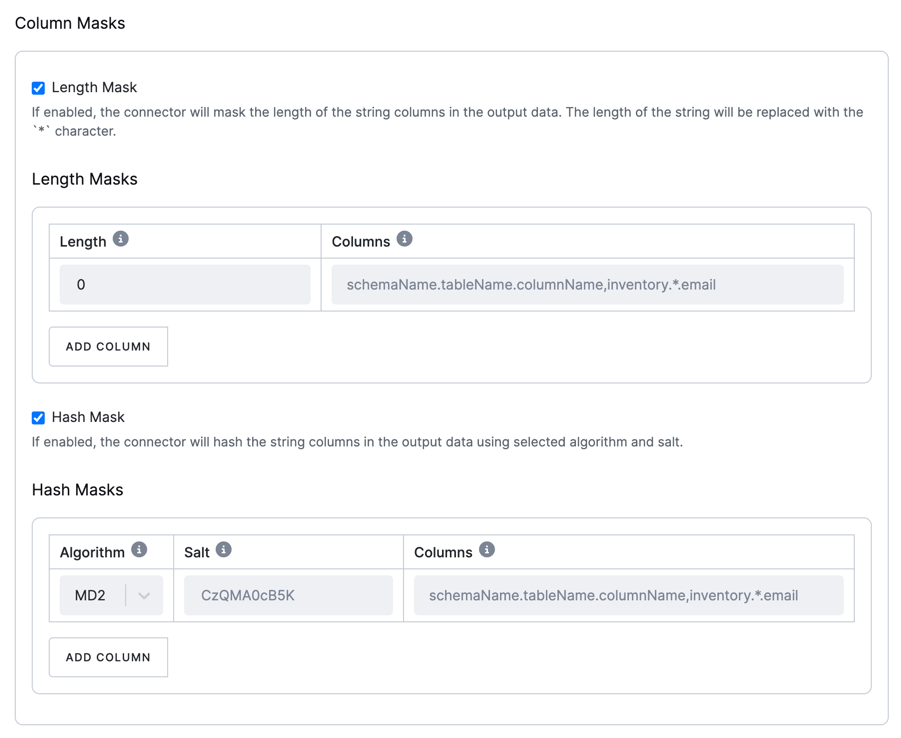
There are two types of masks available:
Length Mask
Section titled “Length Mask”The connector masks the length of string columns in the output data.
The string is replaced with the specified number of * characters.
See the original Debezium docs.
Hash Mask
Section titled “Hash Mask”The connector hashes string columns in the output data using the selected algorithm and salt.
You can choose from various hashing algorithms, such as SHA-256, SHA-512, MD5, and SHA-1.
Based on the hash function used, referential integrity is maintained while column values are replaced with pseudonyms.
Supported hash functions are described in the MessageDigest section of the Java Cryptography Architecture Standard Algorithm Name Documentation.
See the original Debezium docs.
Sync Options
Section titled “Sync Options”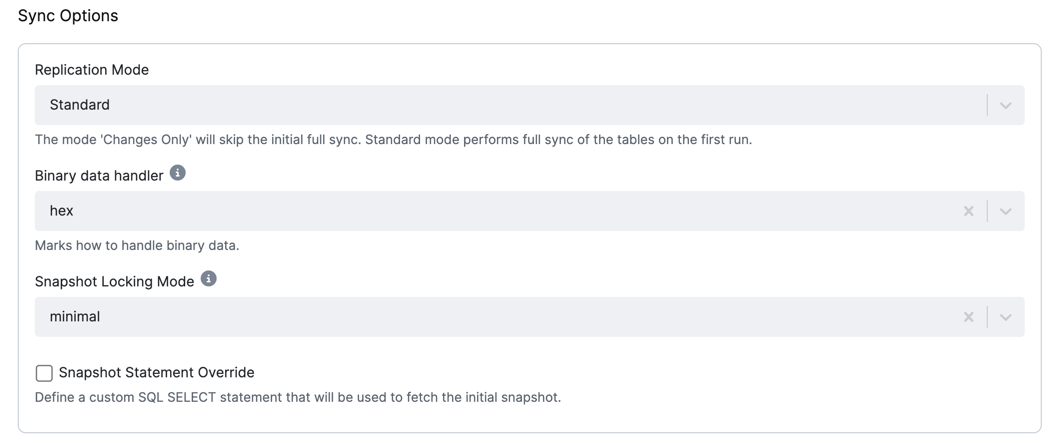
- Replication Mode: The replication mode used. The following options are available:
Standard: The connector performs an initial consistent snapshot of each database. The connector reads the binlog from the point at which the snapshot was made.Changes only: The connector reads the changes from the binlog immediately, skipping the initial load.
- Binary data handler: Specifies how binary columns, such as blob, binary, varbinary, should be represented in
change events. The following options are available:
Base64: represents binary data as a base64-encoded string.Base64-url-safe: represents binary data as a base64-url-safe-encoded String.Hex: represents binary data as a hex-encoded (base16) string.
- Snapshot Locking Mode: Specifies
how long the connector holds the MySQL global read lock during a snapshot:
minimal: Locks only during the initial schema read, then releases while using aREPEATABLE READtransaction for consistency.extended: Locks for the entire snapshot to avoid conflicts with concurrent operations.none: No table locks; this is safe if no schema changes occur. MyISAM tables still lock by default.
- Snapshot Statement Override: Define a custom SQL SELECT statement to be used for fetching the initial snapshot.
Destination
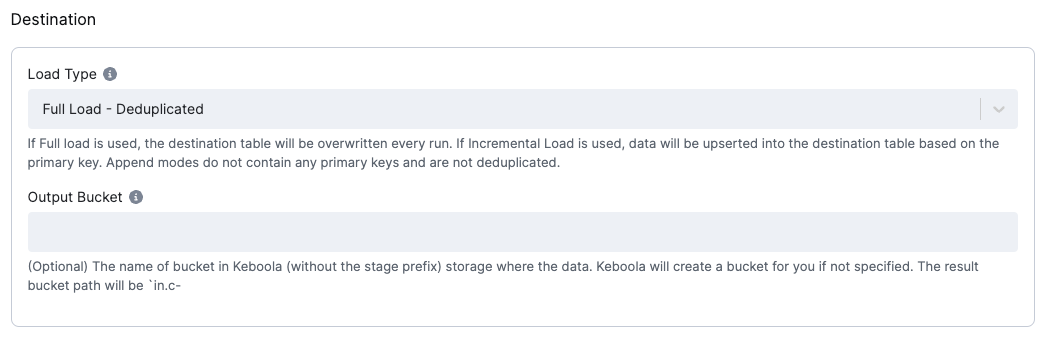
Section titled “Destination”The destination is a mandatory configuration option. It is used to specify how the data is loaded into the destination tables.
Load type
Section titled “Load type”The Load Type configuration option specifies how the data is loaded into the destination tables.
The following options are available:
Incremental Load - Deduplicated: The connector upserts records into the destination table. The connector uses the primary key to perform an upsert. The connector does not delete records from the destination table.Incremental Load - Append: The connector produces no primary key. The order of the events will be given by theKBC__EVENT_TIMESTAMP_MScolumn + helperKBC__BATCH_EVENT_ORDERcolumn, which contains the order in one batch.Full Load - Deduplicated: The destination table data will be replaced with the current batch and deduplicated by the primary key.Full Load - Append: The destination table data will be replaced with the current batch, and the batch won’t be deduplicated.
Output bucket
Section titled “Output bucket”Optionally, you may specify an output bucket in Keboola Storage (without the stage prefix) that will be used to store the result tables.