

Pingdom
This data source connector helps you import data from Pingdom.
Pingdom is a service for monitoring the uptime and performance of your servers, websites, and web applications.
Create a New Application API Key
Section titled “Create a New Application API Key”Before you can start configuring your Pingdom connector, you must obtain an application key. To do that, log in to your account on the Pingdom site.
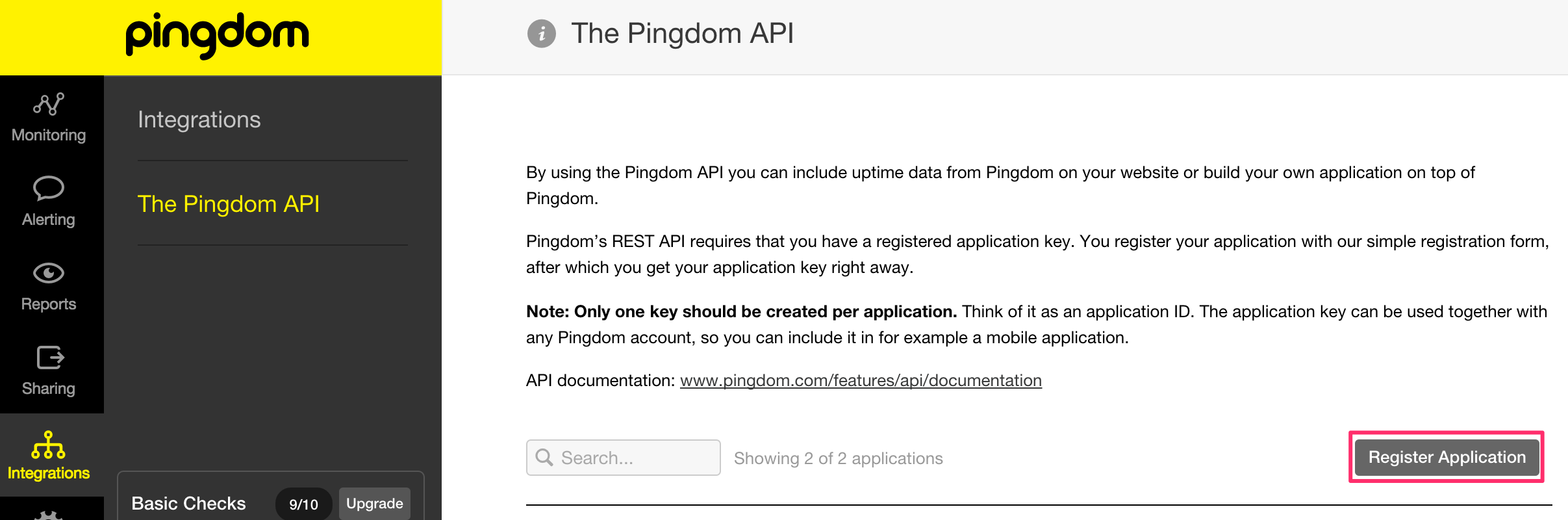
Then, continue to the Integrations > The Pingdom Api section and click the Register Application button.
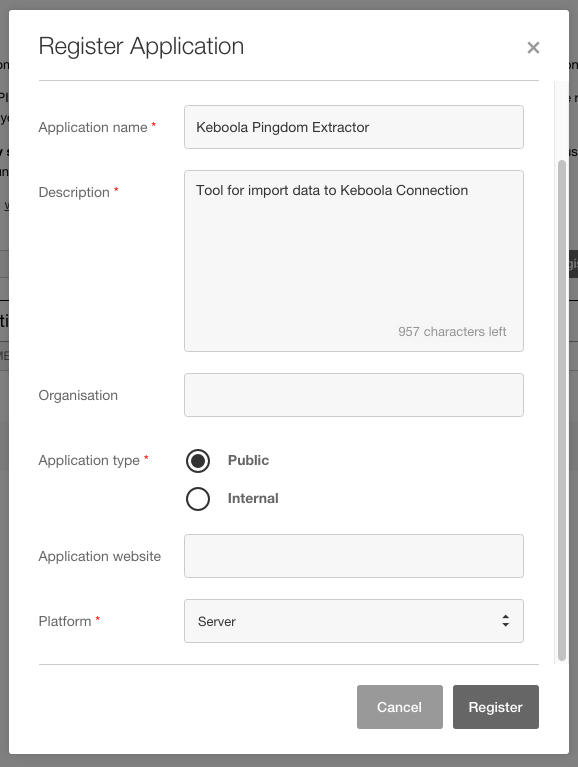
Fill in the required fields of the registration form.
- Application name — Name your application — for example,
Keboola Pingdom Connector. - Description — Enter a description.
- Application type — Select the
Publicoption. - Platform — Select the
Serveroption.
When registration is finished, copy the Application Key and save it. You will need it when creating your connector configuration in Keboola.

Configuration
Section titled “Configuration”Create a new configuration of the Pingdom data source. Provide credentials of your Pingdom account and the Application Key.
- Email address — your account login name
- Password
- Application API key
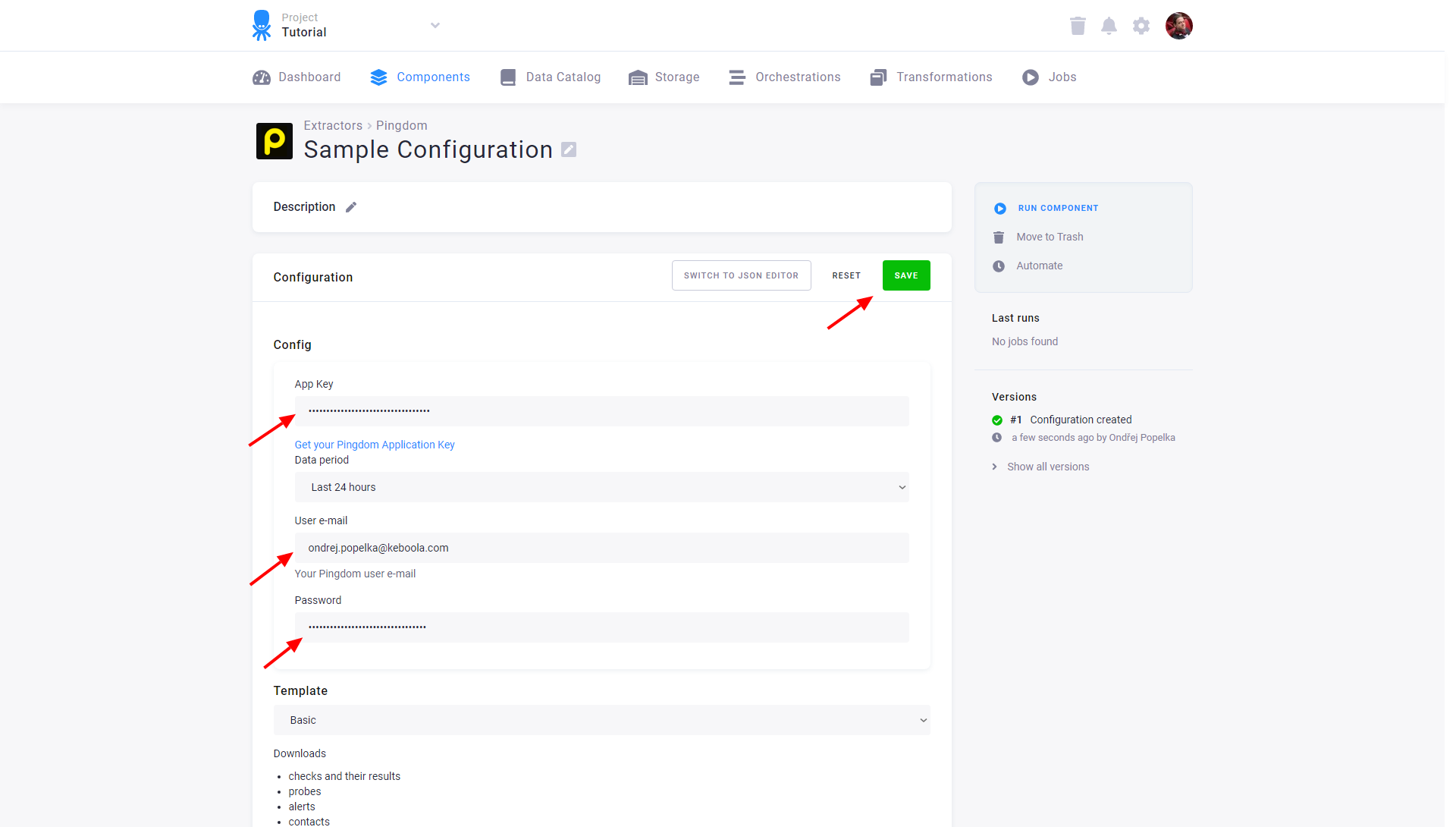
Choose the period you want to fetch data for.
Last 24 hoursLast 3O days— Pingdom API provides history only for up to 30 days before the current day
And finally, select the data Basic template and click on Save. You can also switch to the JSON editor.
Extraction Output Tables
Section titled “Extraction Output Tables”1 — Checks
Section titled “1 — Checks”This table contains an overview of all checks:
| Column | Description |
| id [PK] | Integer representation of the unique identifier for the check |
| name | Check name|
| type | Check type (tcp, https, dns, etc.) |
| lasterrortime | Unix timestamp of the last error, in case an error occurs |
| lasttesttime | Unix timestamp of the last test, in case the check was already tested |
| lastresponsetime | Response time of the last test (in milliseconds) |
| status | Current status of the check (up, down, unconfirmed_down, unknown, paused) |
| resolution | Number of minutes, how often should the check be tested |
| hostname | Target hostname |
| use_legacy_notifications | Use legacy (UP/DOWN) notifications (1 if enabled) |
| alert_policy | Alert policy identifier |
| alert_policy_name | Alert policy name |
| created | Unix timestamp of check creation |
| ipv6 | Use ipv6 instead of ipv4 |
2 — Checks-detailed
Section titled “2 — Checks-detailed”Detailed information of all checks:
| Column | Description |
| id [PK] | Integer representation of the unique identifier for the check |
| name | Check name|
| hostname | Target hostname |
| status | Current status of the check (up, down, unconfirmed_down, unknown, paused) |
| resolution | Number of minutes, how often a check should be tested |
| sendtoemail | Send alerts as an email (1 if enabled) |
| sendtosms | Send alerts as SMS (1 if enabled) |
| sendtotwitter | Send alerts through Twitter (1 if enabled) |
| sendtoiphone | Send alerts to iPhone (1 if enabled) |
| sendtoandroid | Send alerts to Android (1 if enabled) |
| sendnotificationwhendown | Send notification when down n times (integer) |
| notifyagainevery | Notify again every n result (integer)|
| notifywhenbackup | Notify when back up again (1 if enabled) |
| lasterrortime | Unix timestamp of the last error in case an error occurs |
| lasttesttime | Unix timestamp of the last test in case the check was already tested |
| lastresponsetime | Response time (in milliseconds) of the last test |
| created | Unix timestamp of check creation |
| ipv6 | Use ipv6 instead of ipv4 |
3 — Checks-tags
Section titled “3 — Checks-tags”All checks tags:
| Column | Description |
| name | Tag name |
| type | Type of the tag (u tagged by user, a auto tagged by system) |
| count | Number of this tag in check |
| checks_detailed_pk | Check identifier |
4 — Checks-contacts
Section titled “4 — Checks-contacts”This table represents relations between checks and contacts:
| Column | Description |
| contacts_pk | Contact identifier |
| checks_detailed_pk | Check identifier |
5 — Contacts
Section titled “5 — Contacts”All contact data:
| Column | Description |
| id [PK] | Integer representation of the unique identifier for the check |
| name | Contact name |
| email | Contact email |
| cellphone | Contact cellphone |
| countryiso | Cellphone country ISO code |
| defaultsmsprovider | Default SMS provider |
| directtwitter | Send Twitter messages as Direct Messages |
| twitteruser | Twitter username |
| paused | 1 if the contact is paused |
6 — Probes
Section titled “6 — Probes”The Pingdom probe servers list:
| Column | Description |
| id [PK] | Integer representation of the unique identifier for the probe |
| name | Probe name |
| countryiso | Country ISO code |
| city | City |
| region | Region of probe (NA for North America, EU for Europe, etc) |
| hostname | DNS name |
| ip | IP address |
| ipv6 | IPV6 address |
| active | 1 if probe currently active |
7 — Results
Section titled “7 — Results”Raw test results for all checks:
| Column | Description |
| probes_pk [PK] | Probe identifier |
| checks_pk [PK] | Check identifier |
| time [PK] | Time when the test was performed as unix timestamp |
| status | Result status (up, down, unconfirmed_down, unknown, paused) |
| responsetime | Response time (in milliseconds) (Will be 0 if no response received) |
| statusdesc | Short result status description |
| statusdesclong | Long result status description |
| analysis_pk | Analysis identifier |
8 — Credits
Section titled “8 — Credits”Information about current plan limits, SMS credits and SMS auto-refilling:
| Column | Description |
| availablesms | SMS credits remaining |
| availablesmstests | SMS provider tests remaining |
| autofillsms | Automatically refill your SMS credits (1 if enabled) |
| autofillsms_amount | Number of credits to refill |
| autofillsms_when_left | Automatically refill when n SMS credits left |
| defaultchecklimit | Checks: Total slots |
| availabledefaultchecks | Checks: Remaining free slots |
| useddefault | Checks: Number of used slots |
9 — Alerts
Section titled “9 — Alerts”Detailed information on generated alerts:
| Column | Description |
| checks_pk [PK] | Identifier of the check |
| contacts_pk [PK] | Identifier of the alerted contact |
| time [PK] | Unix timestamp of alert creation |
| via [PK] | Alert medium (email, sms, twitter, iphone or android) |
| contactname | Name of the alerted contact |
| status | Alert status (sent, delivered, error, notdelivered or nocredits) |
| messageshort | A short description of the message |
| sentto | Target address, phone number etc. |
| charged | 1 if the account was charged for this message |